
Cloud vs On-Premise Infrastructure: Where Should Your Software Actually Run?
A practical guide to cloud vs on-premise infrastructure for software — what each means, how they compare on cost, control, security and scale, and how to choose.
- Cloud
- Infrastructure
- DevOps
- On-Premise

Before a single feature ships, every software team makes a decision that quietly shapes its cost structure, its release speed, its security posture, and how far it can grow: where will the software actually run? Rent capacity from a cloud provider, or own the servers yourself on-premise?
It is tempting to treat this as settled — “everything is cloud now” — but that reflex hides a real engineering and business trade-off. The right answer depends on your workload, your regulatory environment, your team, and your time horizon. This guide explains what cloud and on-premise infrastructure really are, compares them on the dimensions that matter, and ends with a straight way to decide — including the hybrid approach most mature organizations actually land on.
What “infrastructure” really means
Infrastructure is everything underneath your application: the compute that runs your code, the storage that holds your data, the network that moves it, and the layers in between — the operating system, the runtime, the virtualization, and the physical building, power, and cooling that keep it all alive.
The core question of cloud versus on-premise is simply: how much of that stack do you operate yourself, and how much does someone else operate for you? Owning all of it gives you maximum control and maximum responsibility. Renting it shifts responsibility — and a different kind of cost — onto a provider.
On-premise: you own the stack
On-premise (often shortened to “on-prem”) means you run your software on hardware you own and operate, in your own data center or a space you rent in a colocation facility. You buy the servers, you maintain them, and you are responsible for everything from the network switch to the application.
How on-premise works
You forecast the capacity you will need, purchase servers and networking gear up front, install and configure the operating systems and runtimes, and keep it all patched, powered, cooled, and secured. Scaling up means buying and racking more hardware. The defining trait is ownership: the cost is mostly paid up front, before the workload even arrives, and the responsibility is end-to-end.
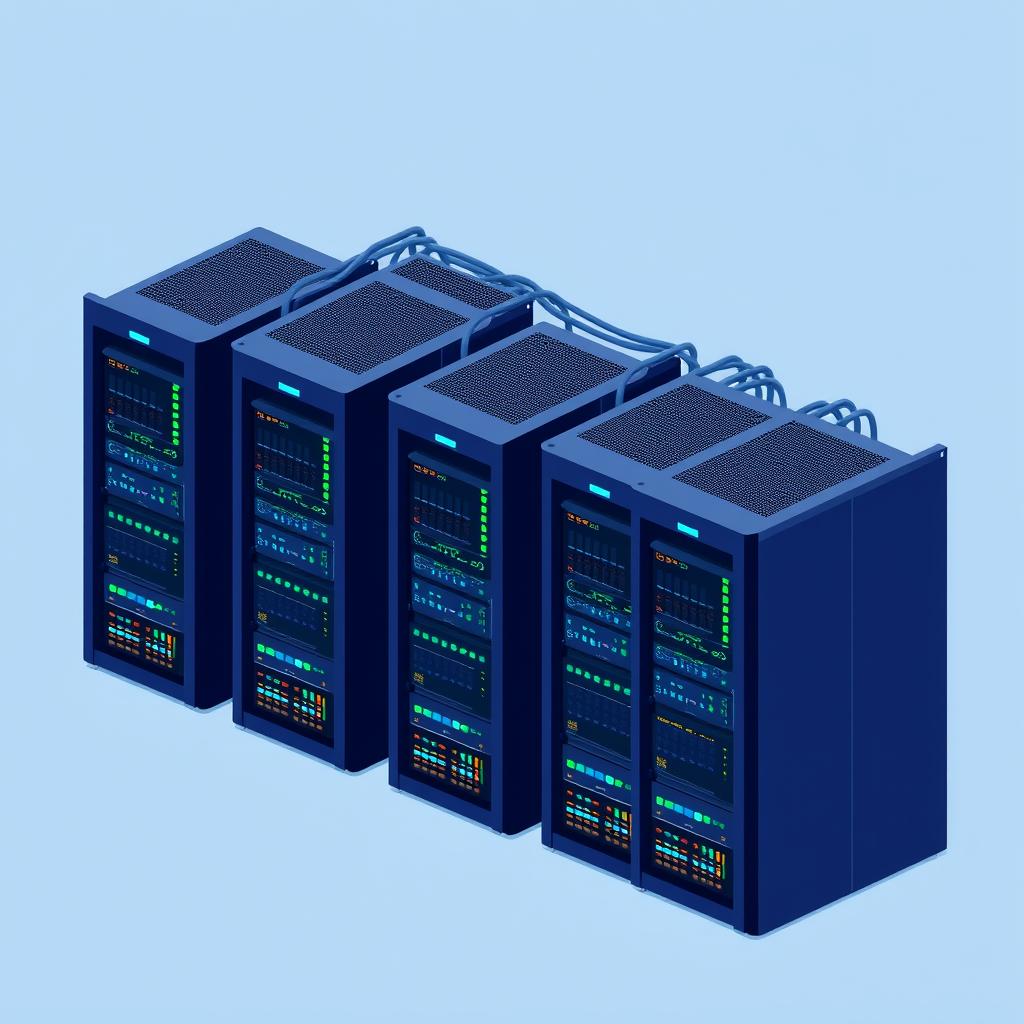
On-premise puts the whole stack — hardware, network, and operations — inside your own walls.
Where on-premise wins
- Control and customization. You choose the exact hardware, network topology, and configuration. For specialized or performance-sensitive workloads, that control is hard to replicate.
- Data residency and compliance. When data must physically stay in a specific location — or under a regulator’s direct reach — owning the hardware makes that guarantee straightforward.
- Predictable long-run cost at steady, high utilization. If a workload runs hot around the clock for years, owning the metal can be cheaper over its lifetime than renting equivalent capacity.
- Low, consistent latency for users or systems physically close to your data center.
Where on-premise hurts
- Heavy upfront cost. You pay for capacity before you use it, and you size for the peak — so much of it sits idle most of the time.
- Slow to scale. Adding capacity means procurement, delivery, and racking: weeks or months, not minutes.
- Operational burden. Patching, hardware failure, backups, power, cooling, and physical security are all your problem, and they need a skilled team.
- You carry the risk. Over-provision and you have paid for idle iron; under-provision and you hit a wall exactly when demand is highest.
Cloud: rent what you need, when you need it
Cloud means running your software on infrastructure owned and operated by a provider — AWS, Google Cloud, Azure, and others — which you rent on demand and pay for as you go. Instead of buying servers, you provision them in minutes through an API or console and release them when you are done.
The three service models
How much the provider runs for you depends on the service model you choose. The further you move from IaaS toward SaaS, the more of the stack the provider takes over — and the less you have to operate yourself.
- IaaS (Infrastructure as a Service) — you rent raw compute, storage, and network, and still manage the OS, runtime, and application.
- PaaS (Platform as a Service) — the provider manages the OS and runtime; you deploy and run just your application and data.
- SaaS (Software as a Service) — the provider runs the entire application; you manage only your data and who can access it.
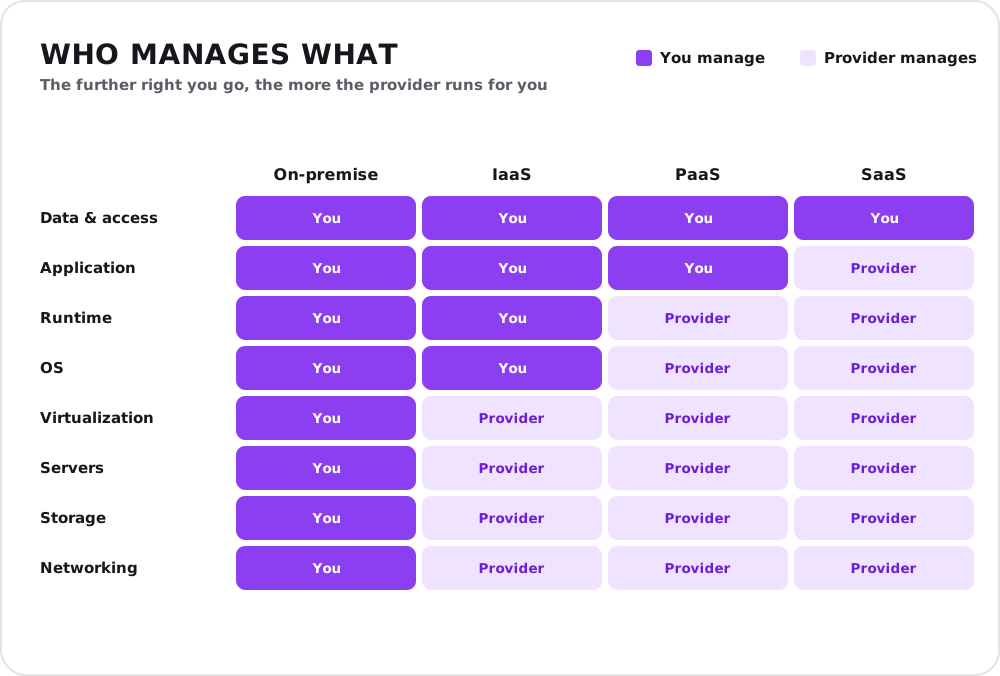
The shared-responsibility model: moving rightward hands more of the stack to the provider — but your data and access are always yours to govern.
Where cloud wins
- Speed and elasticity. Spin up infrastructure in minutes and scale it up or down with demand. You pay for what you use, not for the peak you provisioned.
- No upfront capital. Cost shifts from a big up-front purchase to a monthly bill you pay as you go.
- Global reach. Deploy close to users in regions worldwide without building a data center in each one.
- Managed services. Databases, queues, machine learning, and more come as managed building blocks, so your team builds product instead of plumbing.
Where cloud hurts
- Ongoing cost that grows with usage. Convenient, but a busy workload running for years can cost more in total than owning equivalent hardware.
- Cost surprises. Pay-as-you-go bills can spike; data egress (moving data out) is a frequently underestimated charge.
- Less low-level control. You work within the provider’s options and abstractions.
- Vendor lock-in. Leaning on a provider’s proprietary services makes moving later harder — a real strategic cost.

The cloud trades ownership for elasticity: capacity becomes something you summon and release on demand.
The cost question: pay up front, or pay as you go
The single most misunderstood part of this decision is cost — because cloud and on-premise are cheaper at different times. On-premise asks for a large payment up front and then climbs slowly. Cloud starts near zero and climbs with usage. For a steadily busy workload, the two cross over: cheap-to-start cloud can become the more expensive option once enough time passes.
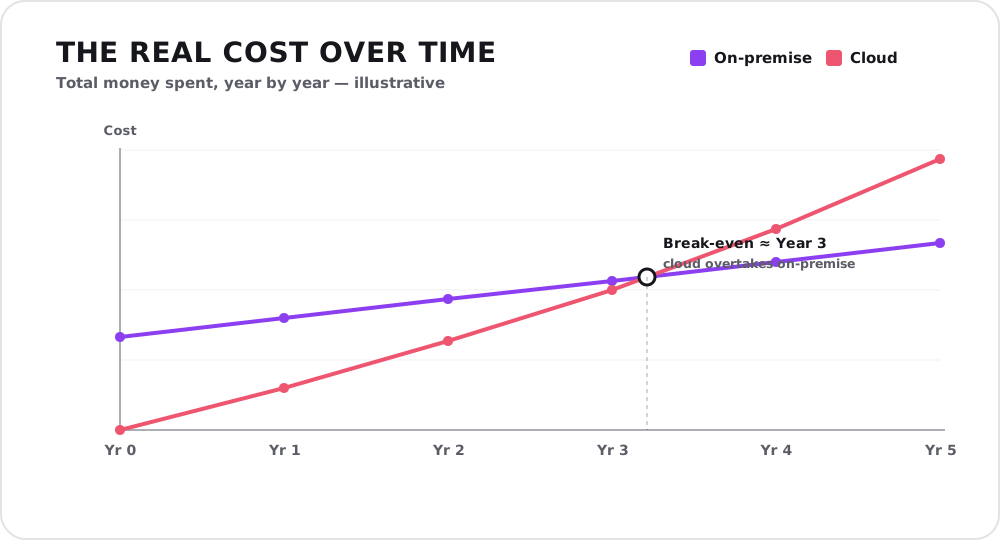
Illustrative figures. The exact break-even point depends on how heavily you use the system, the shape of the workload, and how efficiently each option is run — but the pattern is the point: cloud wins early, owned hardware can win late.
The lesson is not “cloud is expensive” or “on-prem is cheap.” It is that time horizon and utilization decide. A spiky, unpredictable, or short-lived workload almost always favors the cloud. A predictable workload running hot for many years is where owned hardware can earn its keep.
There is a second trap hidden in the headline price: the cost you see is rarely the cost you pay. A server’s purchase price or a cloud service’s monthly fee is only the tip. Below the surface sit power and cooling, maintenance and upgrades, staff and expertise, security and compliance, backups, and idle capacity — the line items that quietly dominate the real total.
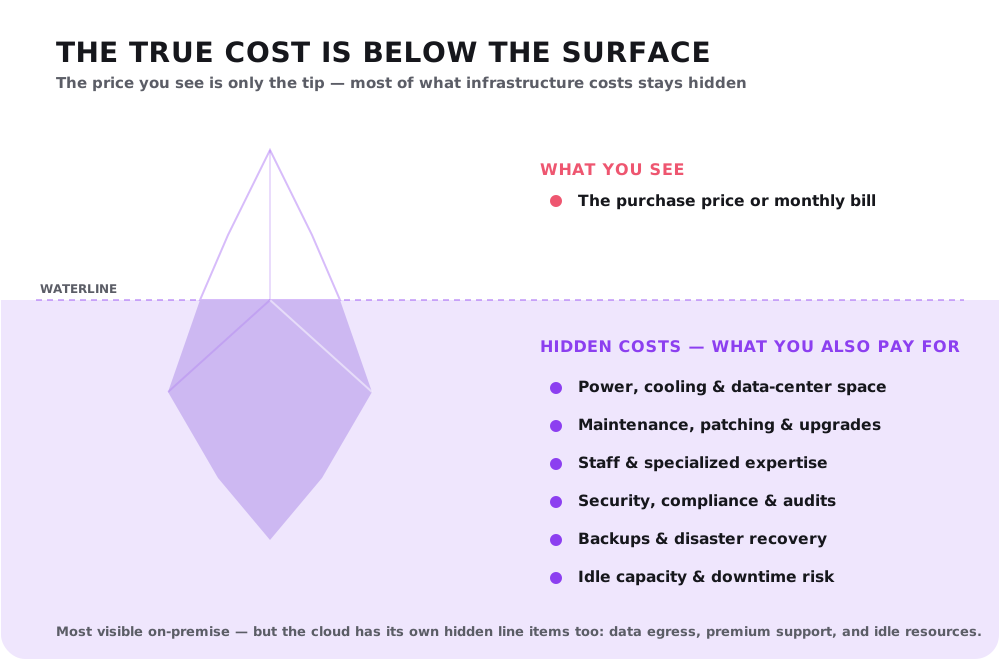
The price on the invoice is only the tip; the bulk of what infrastructure costs sits below the waterline. It is most dramatic for on-premise, but the cloud has its own submerged charges.
Cloud vs on-premise at a glance
| Dimension | On-premise | Cloud |
|---|---|---|
| Upfront cost | High (you buy before you use it) | Low (you pay as you go) |
| Scaling | Slow — procure and rack hardware | Fast — minutes, on demand |
| Control | Full, down to the metal | Bounded by the provider’s options |
| Operational burden | Yours end to end | Largely the provider’s |
| Best cost case | Steady, high utilization, long term | Variable, spiky, or short-lived |
| Time to first run | Weeks to months | Minutes |
| Main risk | Over/under-provisioning | Runaway bills and vendor lock-in |
Hybrid and multi-cloud: the pragmatic middle
In practice, the choice is rarely all-or-nothing. Most mature organizations run a hybrid model: keep sensitive, steady, or latency-critical workloads on-premise, and put elastic, bursty, or fast-moving workloads in the cloud. A regulated core database can live on owned hardware while the customer-facing app scales in the cloud in front of it.
Multi-cloud — spreading workloads across more than one provider — goes a step further to reduce lock-in and improve resilience, at the cost of added complexity. Both approaches accept a simple truth: different workloads have different needs, and forcing them all onto one model is how you end up overpaying or under-serving.
How to choose
There is no universally correct answer — only the best fit for your situation. Weigh these honestly:
- Workload shape. Spiky, unpredictable, or seasonal → cloud elasticity wins. Steady and high-utilization for years → on-premise can be cheaper over its life.
- Stage and speed. Early-stage or fast-moving products need to ship now, not procure hardware → cloud. Mature, stable platforms have room to optimize.
- Compliance and data residency. Hard requirements to keep data in a specific place or under direct control → on-premise or a carefully chosen cloud region.
- Team and expertise. A strong infrastructure team can run on-prem well; a lean product team usually gets more leverage from managed cloud services.
- Time horizon. The longer and more predictable the run, the more owned hardware’s economics improve. The shorter or less certain, the more cloud wins.
A few concrete recommendations:
- A new product or startup → cloud. Ship fast, pay for what you use, and avoid betting capital on capacity you cannot yet predict.
- A spiky or seasonal workload → cloud, with autoscaling so you pay for peaks only when they happen.
- A steady, high-volume workload running for years → model the total cost of ownership honestly; owned or colocated hardware may win on the long run.
- A regulated or data-sensitive core → on-premise (or a compliant region), often as the private half of a hybrid setup.
- An organization with mixed needs → hybrid: right-size each workload to the model that fits it, rather than forcing one model on everything.
Conclusion
Cloud and on-premise are not rivals so much as different tools for different workloads. Cloud trades ownership for speed, elasticity, and a low starting cost — ideal when you cannot predict demand or cannot afford to wait. On-premise trades flexibility for control, data residency, and economics that reward steady, long-lived, high-utilization workloads. And for most organizations of any size, the honest answer is both: a hybrid that puts each workload where it belongs.
The real goal is not to be “cloud-native” or “on-prem” as a matter of identity — it is to run each part of your system on the infrastructure that makes it cheapest to operate, fastest to evolve, and safe to trust.
If you would like a second opinion on where your next system should run — and how to size the cost honestly before you commit — that is exactly the kind of conversation we enjoy. Reach out for a free consultation.